 Luma
Beat Mix: DJ-style transitions
Playback, updated
Beat Mix moves from one song to the next the way a DJ would: it looks for fitting spots in both songs, lays them over each other on the beat, swaps the bass or cuts on the beat. Beat Mix is available since Luma 2.0 on iPhone and iPad and since Luma for Mac 1.4.0.
What Beat Mix does
For every transition, Beat Mix plans how the playing song hands over to the next one. To do that, Luma knows each song's tempo, its beats, the spots where a new section begins and where there's singing. From that, Beat Mix picks one of four kinds:
| Transition | What happens |
|---|---|
| Long blend on the beat | Both songs run at the same tempo, beat on beat. At a section change in the first song the next one takes over the bass, then the first thins out and disappears. |
| Filter entry | The next song comes in under the first without its bass. At the section change it takes over completely, and the first one echoes out. |
| Cut on the beat | The first song plays up to a section change and echoes out there; the next one starts right on that beat. This works even when the tempos are far apart. |
| Soft blend | Without a beat match: the first song thins out and steps back while the next one rises and the bass changes sides. This kind also suits music without a steady beat. |
Beat Mix picks the kind anew for every pair, with some chance, so the transitions don't sound predictable. The kind used last is less likely to come again right away. A few rules always apply:
- On the beat only at similar tempos: if the two tempos are at most 10 percent apart, Luma adjusts the next song's tempo for the blend and then gently brings it back to its own. If they're further apart, Beat Mix chooses a cut or a soft blend.
- No two voices at once: Beat Mix tries out several transitions for every pair and takes one where the two songs don't sing at the same time. If that doesn't quite work out, it takes the one with the shortest overlap.
- Every song gets its time: a transition starts 30 seconds into a song at the earliest. If a song itself came in through a mix, it plays for at least 30 seconds (50 seconds in DJ mode) before the next mix begins.
- Even volume: during the transition the volume stays about where a single song would be.
Luma renders the whole transition a few seconds ahead, with tempo, bass, filter and echo. Beat Mix shapes the transitions where one song flows into the next on its own, including the songs from Endless. When you tap “Next Track”, Luma switches right away.
Turn on Beat Mix
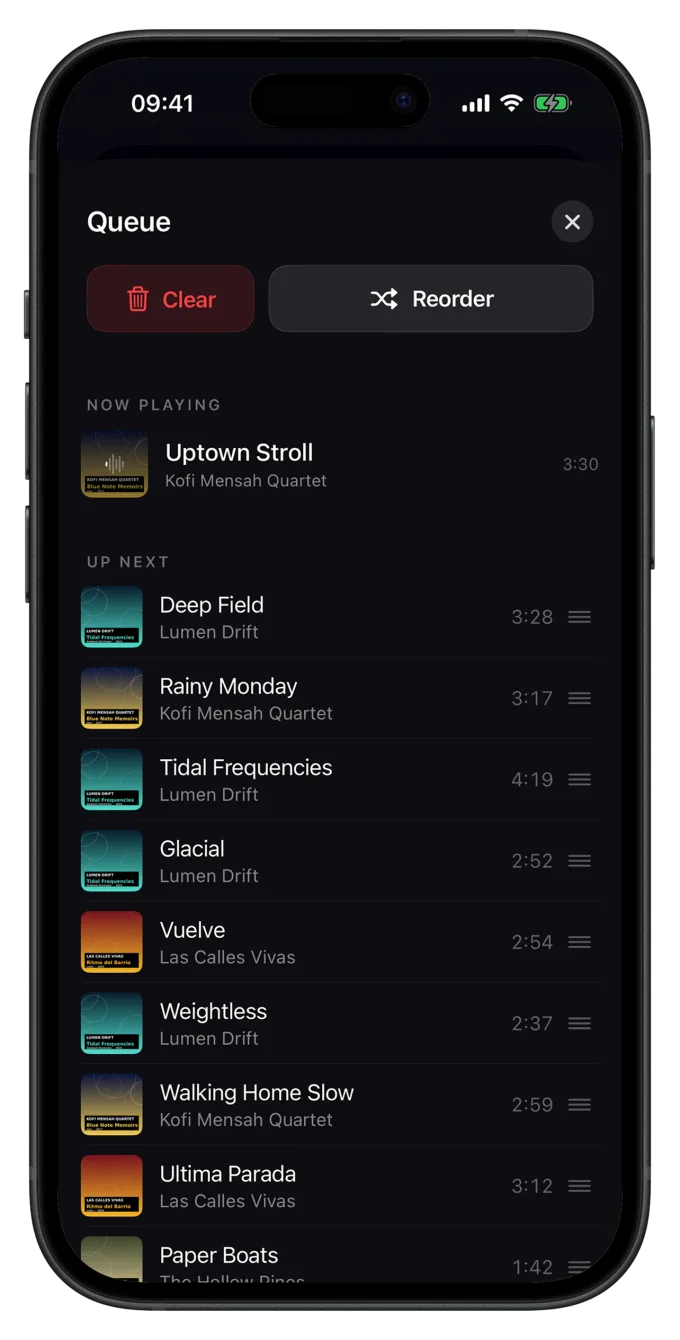
Beat Mix is off by default. You turn it on and off right in the queue:
- Open the playerTap the mini player.
- Open the queueTap the list button at the bottom right of the player. On the iPad and the unfolded iPhone Duo, the queue opens in its own window.
- Tap Beat MixAbove the list are three buttons: Reorder, Endless and, on the right, Beat Mix with the two-circles icon. When the button is light, Beat Mix is on.
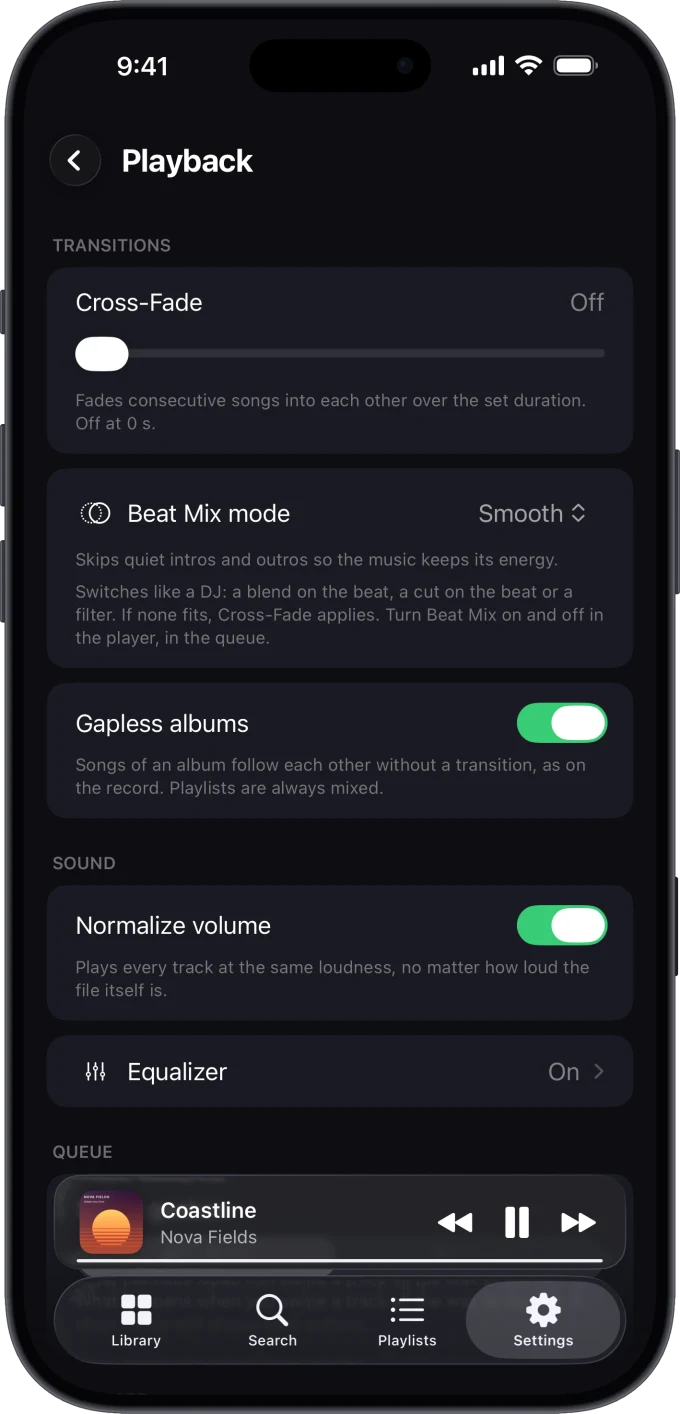
On the Mac the button sits at the top of the queue next to Reorder. How freely Beat Mix mixes is set under Settings › Playback › Beat Mix mode, on iPhone, iPad and Mac. Since Luma 2.1 you can also pick it right in the queue on iPhone and iPad: hold the Beat Mix button and pull down, and Smooth and DJ fold out. Let go over a mode to pick it, which also turns Beat Mix on. A short tap turns Beat Mix on or off as before. The mode stays saved, even while Beat Mix is off.
If you turn Beat Mix off while a transition is already playing, that transition finishes. Transitions that are only planned are dropped, and Cross-Fade applies again.
Smooth and DJ
The Beat Mix mode has two settings:
- Smooth (default): skips quiet intros and outros so the music keeps its energy. To do that, a song may be left a little before its end, and the next one comes in where it really gets going. The transitions stay fairly short and gentle.
- DJ: mixes as freely as it can. Beat Mix leaves songs much earlier, enters the next one later and lets both run together for a long time, up to three quarters of a minute. It sounds more like one continuous mix.
In both modes, a song that Beat Mix leaves more than five seconds before its end is faded out over at least five seconds, so it doesn't end abruptly. If you change the mode, Luma plans the next transition again.
Albums and playlists
Many albums are meant to be heard in one go, such as live albums, concept albums or classical music. For those, Settings › Playback has the Gapless albums switch. It appears as soon as Beat Mix or Cross-Fade is on, and it's on by default.
- Albums: when you play an album, each song flows into the following track of the same album without a gap, as on the record. This applies when the next song has the next track number on the same disc.
- Playlists and collections: these are always mixed, even between two songs from the same album. In a playlist they're two songs like any others.
If you turn Gapless albums off, Beat Mix mixes within albums too.
What you see during a mix
While a transition runs, the word Beat Mix appears below the timeline on the iPhone and iPad, with a shine running across it, and the timeline glows. The player still shows the first song at that point. As soon as the next one takes over, title and artwork change, and the player's colors glide to the new artwork. On the Mac, “Beat Mix” appears in the playback bar next to the song, and the progress bar lights up.
If you've turned on Technical Details, the Status row in the signal path names the kind of transition that's running, such as “Beat Mix: filter entry”. The Beat Mix section shows the song's measured tempo in BPM, or “No steady beat found”.
The analysis on your device
So that Beat Mix can plan, Luma listens to every song once, right on your iPhone, iPad or Mac. It measures where the music starts and ends, how the song ends (abruptly, with a fade-out or with a quiet outro), the tempo and the beats at the start and at the end, where the kick drum sits, where a new section begins and where there's singing. None of this leaves your device.
- Only what plays: Luma analyzes the playing song and the next five in the queue, and only while Beat Mix is on. Nothing happens during the import or for the rest of the library.
- Once per song: the result is a few hundred bytes per song. Luma keeps it and uses it again next time. If the file changes, Luma measures it again.
- Light on resources: only one song is analyzed at a time, and only as many as are needed soon. If you turn Beat Mix off, the analysis stops right away and the measurements are kept.
When Cross-Fade takes over
If no Beat Mix transition fits, your Cross-Fade setting applies. At 0 seconds, the songs follow each other without a gap. That happens in these cases:
- The playing song hasn't been analyzed yet, for example right after you turned Beat Mix on.
- A song is longer than ten minutes, such as a live set or an audiobook. Luma doesn't analyze songs like that.
- The file can't be read or is silent.
- The playing song has less than a minute of music, or the next one is shorter than 30 seconds, such as an intro or a skit.
- One of the two songs is an Opus file or has more than two channels, or the next song has a sample rate above 96 kHz.
- The sleep timer is set to “Track End” or would run out in the middle of the transition.
- You jump to a spot shortly before a song's end and it's too late for the planned transition.
More about Cross-Fade and sound in Sound: equalizer, volume, cross-fade.
Does Beat Mix change my files?
No. Beat Mix only mixes during playback; your music files stay unchanged. Apart from the transitions and the parts Beat Mix leaves out for them, you hear every song as you would without Beat Mix.
Why does a transition sometimes sound like a normal cross-fade?
When a song has no steady beat or the tempos are far apart, Beat Mix often chooses the soft blend. Cross-Fade also applies in the cases listed above, for example on the first play right after turning Beat Mix on, while the song hasn't been analyzed yet.
Still have a question or found a mistake? Email hello@suenavus.com.